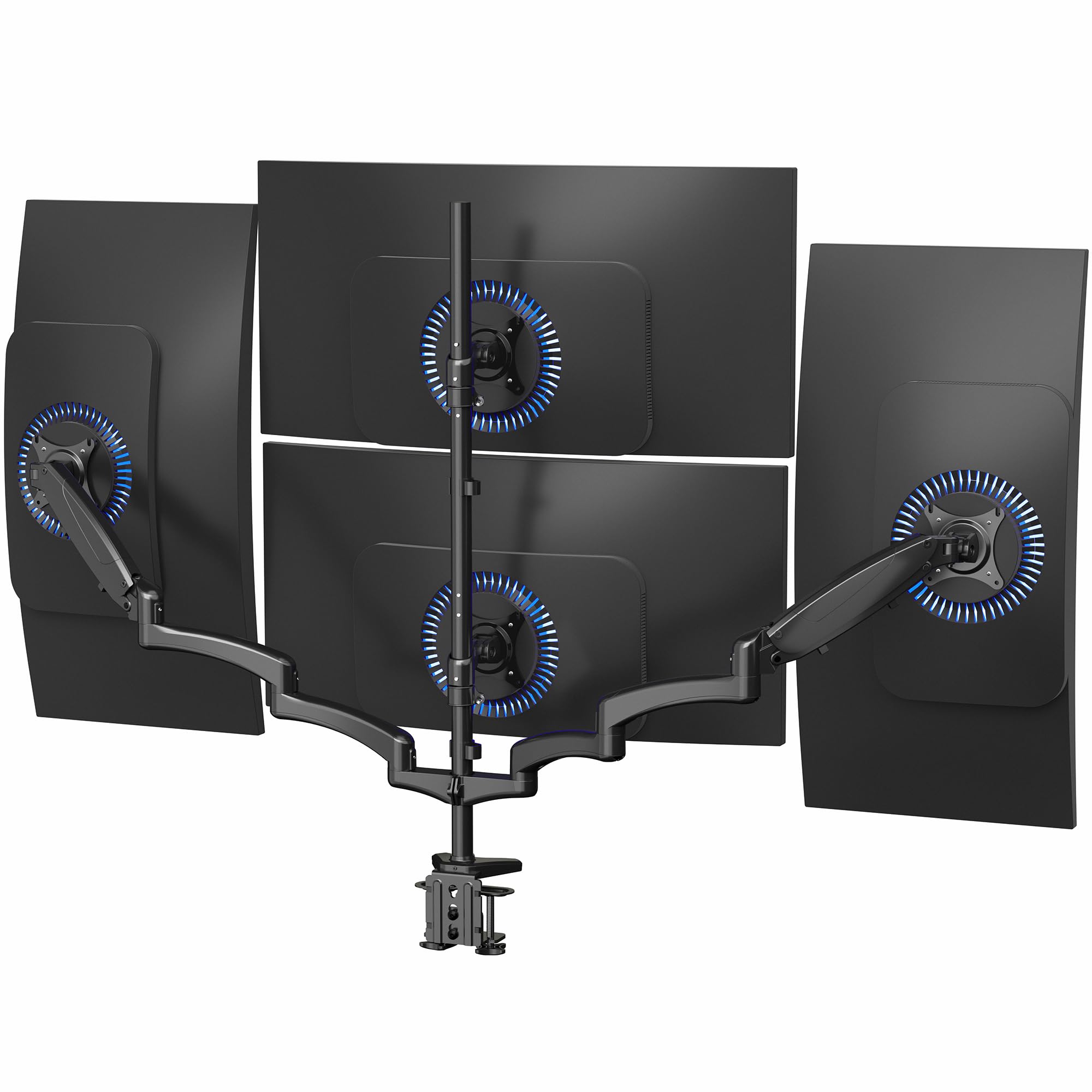
The VIVO Quad Pneumatic Monitor Mount review centers on a specific four-screen setup: two pneumatic side arms paired with two fixed center brackets.
It may suit a desk workstation that needs four compatible displays and room freed from individual stands.
VIVO Quad Mount Review Summary
The quick verdict
2,000+ ratings
Read Amazon ReviewsVIVO STAND-V400G Quad Pneumatic Monitor Mount
A four-screen desk mount for users with compatible 17–32-inch monitors who want adjustable side arms and a compact, clamp-mounted setup.
- Holds four monitors measuring 17 to 32 inches, with a maximum weight of 17.6 pounds per screen.
- Accepts VESA 75×75 mm and 100×100 mm mounting patterns.
- Combines two pneumatic side arms with two fixed center brackets.
- The side arms provide +90° to −90° tilt, 180° swivel, and 360° rotation.

Pros
- Accommodates four monitors on one desk-mounted stand.
- Pneumatic side arms offer adjustable positioning and counterbalance support.
Consider before buying
- The center brackets are fixed, so the middle displays have less adjustment freedom than the side screens.
- Every monitor must meet the stated size, weight, and VESA requirements; check all four before purchasing.
Read the full review summary
The STAND-V400G supports four monitors, each measuring 17 to 32 inches and weighing up to 17.6 pounds, with VESA 75×75 mm or 100×100 mm mounting holes.
Its side arms use pneumatic springs for counterbalanced movement, while the center brackets are fixed. That combination gives the outer screens more repositioning flexibility than the central pair.
A heavy-duty C-clamp attaches the mount to a desk or other surface up to 3.25 inches thick, so there is no need to drill a mounting hole.
Consider it if all four screens meet the size, weight, and VESA requirements and your desk can accommodate the clamp. The arrangement is less suitable if you want independent arm movement for every screen.
The buying factors
VIVO Quad Mount Scorecard
Editorial scores reflect listed features and buyer fit; they are not laboratory measurements or customer ratings.
Four-screen capacity
Designed to hold four displays, with support for screens up to 17.6 pounds each.
Monitor compatibility
The 17–32-inch range and two common VESA patterns cover a defined set of screens; check each monitor's weight and mounting pattern.
Side-arm adjustability
The pneumatic side arms support tilt, swivel, and rotation, with springs intended to counterbalance monitor weight.
Center-screen flexibility
The two center brackets are fixed, making the layout less adaptable than a mount with four independently articulating arms.
Desk mounting
The C-clamp supports surfaces up to 3.25 inches thick and avoids drilling.
Setup guidance
Hardware and step-by-step instructions are included; assembling a four-screen setup still requires aligning several displays.
Warranty coverage
A three-year warranty is specified for the mount.
Key Features and Specifications of VIVO Quad Mount
- Holds four monitors measuring 17 to 32 inches, with a maximum weight of 17.6 pounds per screen.
- Accepts VESA 75×75 mm and 100×100 mm mounting patterns.
- Combines two pneumatic side arms with two fixed center brackets.
- The side arms provide +90° to −90° tilt, 180° swivel, and 360° rotation.
- Pneumatic springs counterbalance the monitors, and arm tension can be adjusted for heavier or lighter displays.
- A heavy-duty C-clamp attaches to surfaces up to 3.25 inches thick.
- The mount uses steel and aluminum components; assembly hardware and step-by-step instructions are included.
Pros and Cons of VIVO Quad Mount
Pros
- Accommodates four monitors on one desk-mounted stand.
- Pneumatic side arms offer adjustable positioning and counterbalance support.
- C-clamp installation does not require drilling and fits surfaces up to 3.25 inches thick.
- The stated screen weight and VESA limits are clear, making compatibility checks straightforward.
- Includes a three-year warranty.
Consider before buying
- The center brackets are fixed, so the middle displays have less adjustment freedom than the side screens.
- Every monitor must meet the stated size, weight, and VESA requirements; check all four before purchasing.
- The clamp needs a suitable desk edge and enough thickness clearance; confirm the desk dimensions and underside access.
Who Should Buy VIVO Quad Mount?
Good fit
Consider the VIVO STAND-V400G if your workspace depends on four displays and you want to consolidate their support on one clamp-mounted stand.
Its 17–32-inch range and 17.6-pound-per-monitor limit give you concrete checks to make before committing: verify each screen's weight, diagonal size, and VESA pattern.
The two pneumatic side arms are the main advantage for a mixed workflow where the outer monitors need frequent angle or orientation changes.
Adjustable tension may help tune those arms to the load, while the fixed center brackets keep the central pair in a less flexible position. Make sure that division of movement suits how you arrange your screens.
Measure the desk surface and check that the clamp can attach securely within its 3.25-inch thickness limit. The included instructions and hardware provide a starting point for assembly, and the three-year warranty adds a defined coverage period.
Who should skip it
Skip this layout if you need to reposition all four screens independently. Only the two side arms are pneumatic and adjustable; the center brackets are fixed.
Look elsewhere if any monitor falls outside the specified size or weight range, lacks a compatible VESA pattern, or if the desk edge cannot accommodate the clamp.
How the VIVO Quad Mount fits a four-screen desk
Two moving arms and two fixed brackets
The arrangement divides the four displays into a more adjustable pair on the sides and a fixed pair in the center.
That can work well when the central screens serve as a stable main viewing area and the outer screens need to turn or tilt.
If your routine calls for changing the position of every screen, the fixed brackets are a meaningful constraint.
Check compatibility screen by screen
The mount's stated limits apply per monitor: each display should measure 17 to 32 inches, weigh no more than 17.6 pounds, and have a 75×75 mm or 100×100 mm VESA pattern.
Check the actual mounting points and weight of all four displays before ordering, especially if the screens differ in model or size.
Plan the clamp location
The C-clamp is designed for a surface up to 3.25 inches thick, which offers a drill-free installation option. Measure the desk where the mount will sit and check that the underside is accessible for the clamp.
A four-monitor arrangement also makes advance placement planning useful: consider how the screens will fit within your working area before assembly.
Tune pneumatic arm tension
The side-arm springs counterbalance monitor weight, and the tension can be raised or lowered to suit heavier or lighter displays.
That adjustment is relevant when the side monitors differ in weight; the center brackets remain fixed regardless of arm tension. Keep each side screen within the per-monitor weight limit when setting up.
Alternatives to VIVO Quad Mount
Computer Monitor Arms alternative
2,000+ ratings
Read Amazon ReviewsVIVO STAND-V004F Quad Monitor Desk Stand
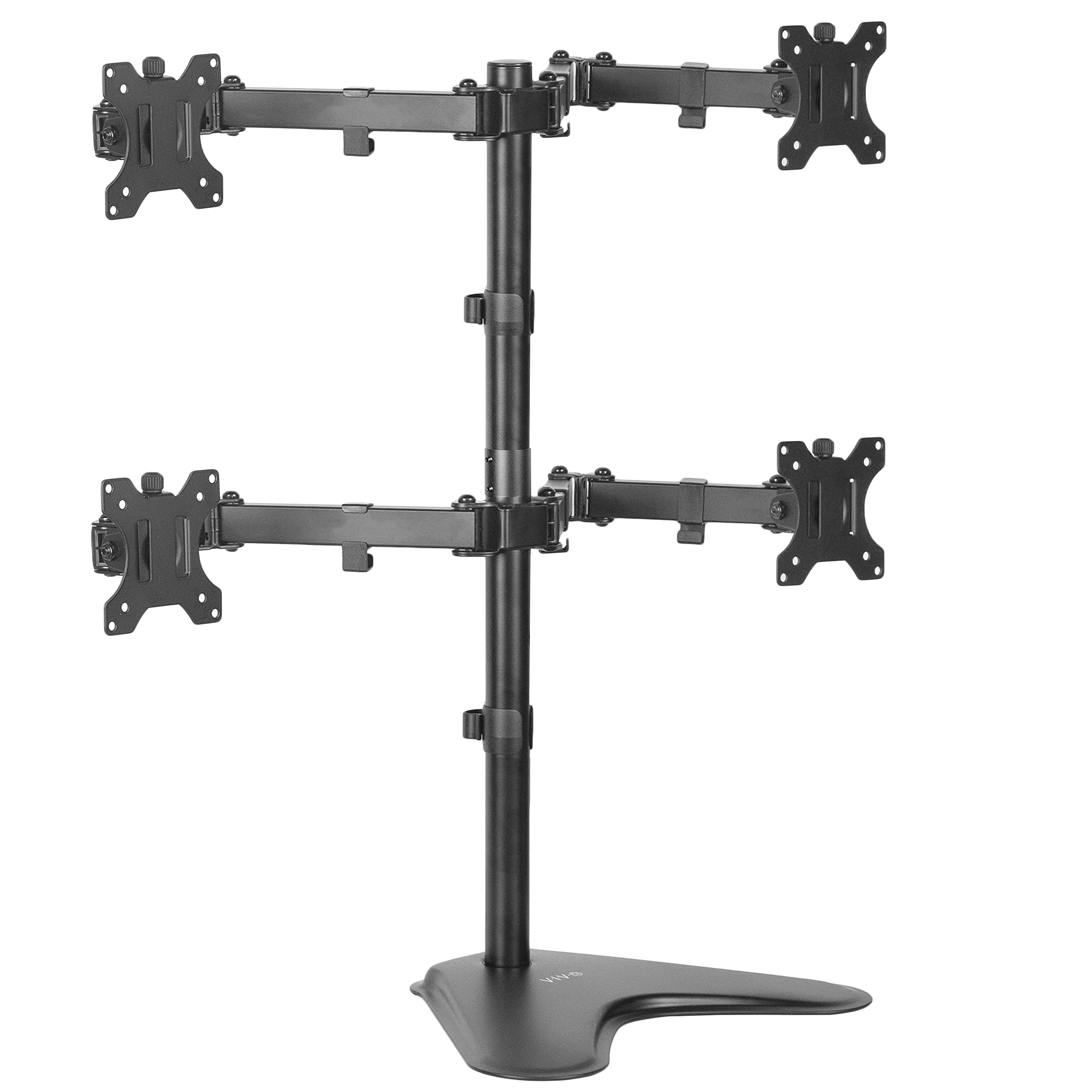
Consider the STAND-V004F if you prefer a freestanding base and your monitors are within its 13–30-inch range. The STAND-V400G may fit better when you want a clamp mount and pneumatic adjustment on the side screens.
- This four-screen model supports 13–30-inch monitors up to 17.6 pounds each and uses a freestanding base measuring 15.25 × 11 inches.
- Its adjustable arms offer tilt, swivel, and rotation.
- The STAND-V400G fits four 17–32-inch screens and has two pneumatic side arms plus two fixed center brackets; it uses a C-clamp.
Computer Monitor Arms alternative
34,000+ ratings
Read Amazon ReviewsHUANUO FlowLift Dual Monitor Stand
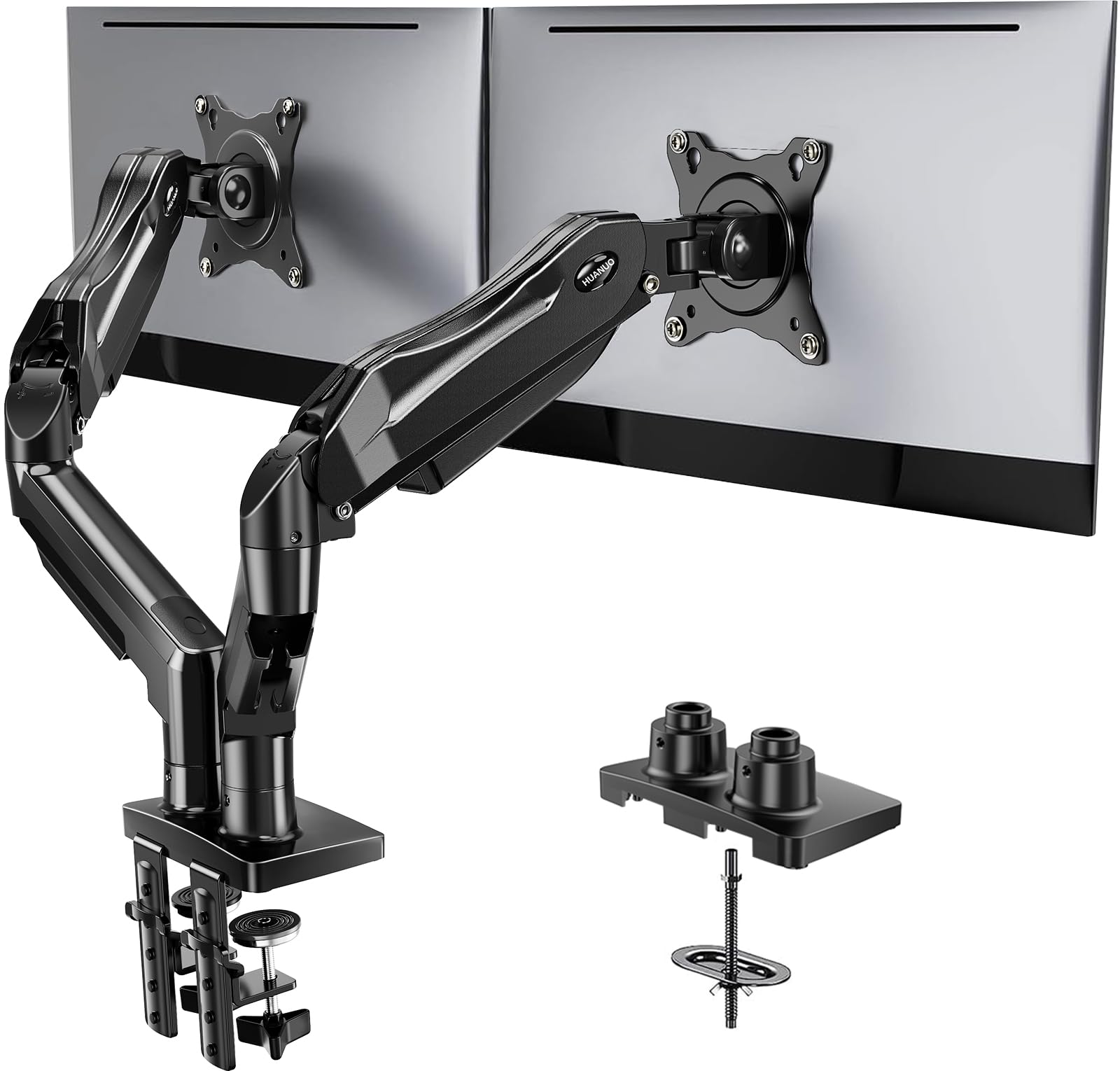
Choose the FlowLift if you only need two displays and want both to have full-motion adjustment, provided your desk meets its stated material and installation conditions.
For a four-screen arrangement, the VIVO quad mount addresses the larger display count.
- The FlowLift holds two 13–32-inch monitors weighing 4.4–19.8 pounds each, with full-motion arms and a C-clamp or grommet mounting option.
- It also lists a desk thickness range of 0.59–3.54 inches and recommends wooden desks.
- The STAND-V400G is designed for four screens up to 17.6 pounds each, with pneumatic movement on the side arms and fixed center brackets.
Is VIVO Quad Mount Worth It?
The VIVO STAND-V400G is worth considering for a four-monitor workstation when all screens fit its size, weight, and VESA limits and the desk supports a C-clamp.
The pneumatic side arms offer useful adjustment, with tension tuning for different monitor loads.
Its key tradeoff is the fixed center pair: this stand is a better fit for layouts where the central screens can stay put than for buyers who want four independently adjustable arms.
Confirm monitor compatibility and desk clearance first, then choose it if that mixed arrangement matches your routine.
Your review at a glance
2,000+ ratings
Read Amazon ReviewsVIVO STAND-V400G Quad Pneumatic Monitor Mount
A four-screen desk mount for users with compatible 17–32-inch monitors who want adjustable side arms and a compact, clamp-mounted setup.
- Holds four monitors measuring 17 to 32 inches, with a maximum weight of 17.6 pounds per screen.
- Accepts VESA 75×75 mm and 100×100 mm mounting patterns.
- Combines two pneumatic side arms with two fixed center brackets.
- The side arms provide +90° to −90° tilt, 180° swivel, and 360° rotation.